


Boost Cleaner
3.61.00 Reviews
App Specs
- Version
- 3.0.0
- Updated On
- License
- Free
- Downloads
- 10,000+
- Developer
- Wycked Few
- Categories
- Productivity
- Platform
- Android
Screenshots
 Analysis by AppCompare
I would choose a phone cleaner by asking one question first: do I want a guided overview, or do I need precise control over individual files? That distinction matters more than any promise of a faster phone. Storage tools can help me find things worth reviewing, but I still want to understand what I am removing before I tap a button.
A practical decision before you install
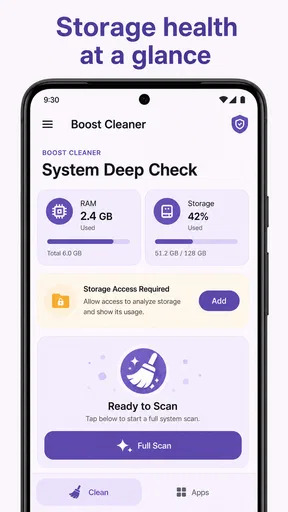
Boost Cleaner is an Android productivity app from Wycked Few, and its focus is on scanning storage, reviewing possible cleanup actions, and managing apps. It is free, has an Everyone content rating, and is on version 3.0.0. For me, the appeal is the combination of those maintenance tasks in one place, rather than a claim that any cleaner can solve every phone problem.
If you mainly want to free space for a specific task, such as downloading a map or recording a long video, a guided scan may be useful. If you already know which folder or application is taking up room, Android’s settings or a file manager may get you there with less guesswork. The right choice depends on whether you need help finding candidates or already know exactly what you want to change.
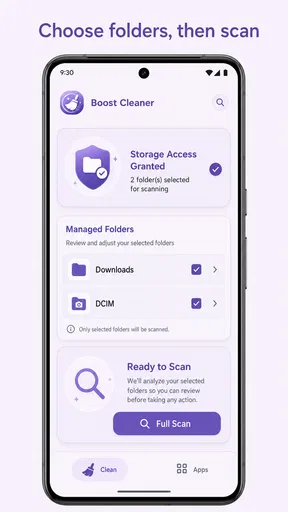
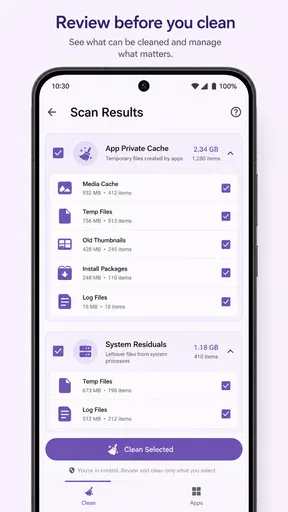
My first impression of Boost Cleaner was that it aims to make a usually confusing maintenance job feel more deliberate. Instead of pushing me toward a single “clean everything” action, it puts storage scanning, cleanup suggestions, and app management into a workflow where I can review what is about to happen. That matters because freeing space is useful, but deleting the wrong file is not.
After spending time with it, my view is fairly clear: this is a practical productivity app for people who want a guided way to inspect an Android device, not a magic performance button. Its best quality is the emphasis on clear controls. Its main weakness is that any cleaner still depends on the user making sensible decisions, so it cannot remove the need to check suggestions carefully.
How the cleanup workflow feels in everyday use
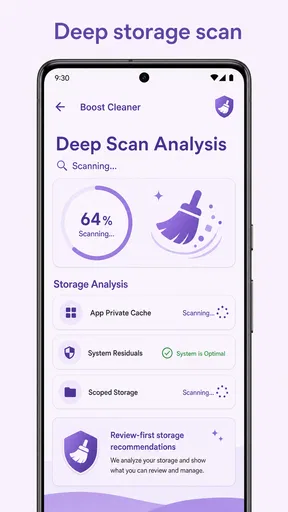
The central experience begins with a storage scan. That sounds simple, but the useful part is what follows: the scan is meant to lead into a review rather than an automatic purge. I prefer that approach for a phone shared between work, personal photos, downloads, and messaging attachments, where a large file may be unnecessary—or may be something I still need.
In a realistic daily situation, I might notice that my phone is running short on space before downloading a large offline file. I would open the app, let it inspect the device, and then treat its suggestions as a shortlist. I would look first at obvious clutter, then pause on anything connected to documents, images, or applications I use regularly. That extra moment is the difference between useful maintenance and an avoidable recovery job.
Worth Reading Before You Choose

EA SPORTS FC Mobile 26 Is a Bigger Football Game, but It Takes Time

Flipboard Shows What News Apps Must Do Beyond the Feed

Switching to Android Auto Means Rethinking Your Driving Routine

Google Calendar Makes a Crowded Week Easier to Manage

Ludo King Makes the Most of the Minutes Between Plans

Baby Panda World Brings Quick Play to Modern Phones, but Its Game Library Feels Busy
The app’s value is therefore less about promising dramatic speed and more about giving me a place to make a storage decision. The strongest habit it encourages is review before removal. For someone who normally opens a file manager and gets lost among folders, that guided sequence can be much easier to follow.
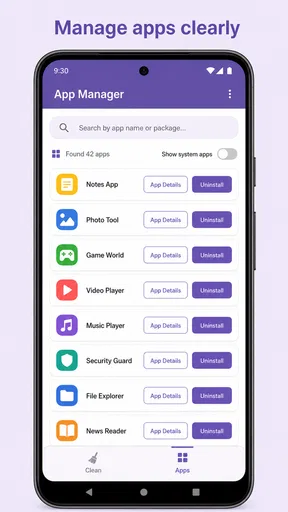
Its app-management side also gives the experience a wider purpose. Storage problems do not always come from temporary files; sometimes they come from applications installed for one short task and then forgotten. Managing apps from the same general maintenance tool can help me notice those candidates without manually checking every page of the system launcher.
What makes the controls useful
Clear controls are especially important in a cleaner because the consequences are more serious than in a basic note-taking or calculator app. I want to know what category I am reviewing, what I am selecting, and whether the action is deliberate. Boost Cleaner presents itself around that kind of control instead of treating cleanup as a one-tap performance ritual.
That design is a good fit for cautious users. I can use the scan as an audit, select only the items I recognize, and leave uncertain material alone. This also makes the app useful as a periodic check rather than something I need to keep opening throughout the day. A short review every so often is more sensible than constantly chasing tiny changes in free space.
One practical tip is to separate “I do not recognize this” from “I do not need this.” Those are not the same thing. If a suggestion is unfamiliar, I would inspect it through the phone’s normal file or app controls before taking action. A cleaner can organize the decision, but it should not replace basic ownership of personal files.
Another useful workflow is to check applications after a busy travel period, a school term, or a temporary project. These are the moments when several one-purpose apps accumulate. Removing an unused application can be more meaningful than repeatedly clearing small bits of clutter, particularly when the phone’s storage is being consumed by software that no longer has a role.
Where it fits among familiar alternatives
The usual alternatives are the phone’s built-in storage settings, a file manager, and manual app removal from system settings. Those options remain valuable, especially for people who want the most direct view of what Android itself reports. The built-in tools may also feel more trustworthy to users who prefer not to add another utility to the device.
Boost Cleaner’s advantage is convenience and concentration. It brings scanning, cleanup review, and app management into one focused destination, which can reduce the jumping between menus that makes manual maintenance frustrating. I would choose it when I want a guided overview rather than a collection of separate system screens.
On the other hand, a dedicated file manager is often better for someone who wants folder-level precision. If I am sorting photographs, moving documents, or identifying a particular download, a file manager gives me a more hands-on relationship with the files. Likewise, system settings are the better choice when I need detailed application information or want to change a specific system-level option.
That comparison reveals the app’s proper role. It is not a replacement for every storage tool. It is a layer of convenience between a completely manual process and an overly aggressive automatic cleaner. For many people, that middle ground is exactly what makes it approachable.
The limitation I would take seriously
The biggest weakness is built into the category: cleanup suggestions can look authoritative even when the final decision still belongs to me. A user who selects everything without reading may get a faster result, but not necessarily a safer one. I would not recommend that behavior with any storage utility, including this one.
There is also a trade-off between simplicity and detail. Clear controls make the first visit less intimidating, but users who want a forensic breakdown of every folder may eventually prefer the phone’s own settings or a full file-management tool. Boost Cleaner is most convincing when it helps me decide what deserves attention; it is less compelling as a replacement for detailed manual organization.
Expectations about “boosting” also need to stay realistic. Removing unneeded material can improve available storage, and uninstalling unused apps can reduce clutter, but that does not mean every phone will suddenly feel faster. Performance depends on many factors outside a cleanup workflow. I see the app as a maintenance assistant, not as a guaranteed cure for an aging device or a demanding workload.
That distinction is important for anyone choosing between this app and a more technical alternative. If the real problem is a specific application that crashes, a system update that needs attention, or a battery issue, I would investigate those areas directly. A storage cleaner is the wrong first answer when storage is not the actual cause.
Who should use it, and who should skip it
I think Boost Cleaner is best for Android users who want a straightforward routine for checking space without learning every storage category in advance. It is particularly suitable for people who install apps for temporary needs, download lots of attachments, or feel uncomfortable navigating system storage screens. The free price also makes it easy to try without turning the decision into a financial commitment.
It can also suit a family member who needs a simpler explanation than “open settings, inspect internal storage, compare categories, and review applications.” I would still show that person how to read suggestions rather than simply approving them. The app can make the process clearer, but good cleanup habits remain part of the lesson.
I would be more cautious about recommending it to power users who already maintain a carefully organized file system. They may gain little from an additional overview layer and may prefer the precision of a file manager. I would also steer away from it for anyone expecting a one-tap solution that guarantees a major speed increase. That expectation is not realistic for this type of tool.
Because the content rating is Everyone, the app is positioned for a broad audience, but that should not be confused with “no supervision needed.” Storage decisions can affect personal documents and memories regardless of age. A younger user should understand that deleting a file is different from merely closing an app, and an older or less confident user may benefit from reviewing uncertain suggestions with someone they trust.
Details that matter before installing
Boost Cleaner is developed by Wycked Few and is available free of charge. It belongs to the productivity side of the app world rather than entertainment, which matches the way I used it: as an occasional utility for reducing digital clutter and keeping applications under control.
The current version is 3.0.0, and it requires Android 8.0 or later. That makes the compatibility question fairly simple for most Android owners: check the operating system before trying to install it, especially on an older phone that has not received recent updates. I would also leave enough time for the first scan rather than opening it only when I am already in a hurry to download something.
Its average rating is 3.9 from thirteen ratings, while the app has passed ten thousand installs. I read those figures as signs of a small but real user base rather than as proof that it is the definitive cleaner for everyone. The more useful question is whether its guided review style matches the way I want to manage storage.
A sensible first session would be deliberately conservative. I would run the scan, read each suggestion, keep anything whose purpose is unclear, and use the app-management area to identify applications I genuinely no longer use. After that, I would check the result through Android’s own storage view. This two-step habit takes a little longer, but it gives me confidence that the cleanup produced the intended outcome.
I would also avoid treating the tool as a daily notification-driven routine. Storage maintenance works best when connected to a real need: preparing for a system update, making room for a trip, clearing out old project material, or dealing with a phone that is genuinely running low. Opening a cleaner without a reason can encourage unnecessary tinkering, and unnecessary deletion is never a benefit.
My verdict after weighing the trade-offs
Boost Cleaner succeeds when it stays in its lane. It offers a more approachable way to scan storage, review possible cleanup actions, and manage applications, with controls that encourage me to participate instead of surrendering the decision to automation. That is a meaningful strength for ordinary users who find Android’s storage menus harder to interpret.
It does not eliminate the need for judgment, and it should not be sold to myself as a universal speed fix. Users who need folder-by-folder control, deep technical diagnostics, or a guaranteed performance transformation will be better served by system settings, a capable file manager, or a tool aimed specifically at their actual problem.
For everyone else, I would recommend trying it with a cautious first scan and a clear goal. If the guided format helps you identify forgotten apps and questionable clutter without making the process stressful, the free utility earns a place in an occasional maintenance routine. My final recommendation is positive for careful, everyday Android users—but only when “cleaner” means informed housekeeping, not blind deletion.
One final way to judge whether it is earning its place is to compare the result with the reason you opened it. If you were trying to make room for a particular download, check that the phone now has enough space before removing anything else. If your goal was to reduce the number of apps you never use, notice whether the app list feels more intentional afterward. This keeps a scan tied to a practical outcome instead of turning cleanup into a vague ritual.
A low-risk way to make the decision
For a first-time user, I would treat the initial scan as a learning pass, not a commitment to clean. Read the suggestions, note which kinds of items appear, and close the app if you are not sure what a category means. You can then verify anything important in Android’s own storage controls before deciding. That approach may seem slow, but it is useful precisely because it prevents an unfamiliar label from becoming an accidental deletion.
My recommendation comes down to working style. Choose this app if you value a consolidated, guided review and are comfortable making the final calls yourself. Choose Android’s settings or a file manager if your priority is exact control over a particular file, deeper inspection, or keeping every maintenance step inside the system tools. For careful users who want a less intimidating starting point, Boost Cleaner is worth trying; for people seeking automatic certainty, it is the wrong kind of solution.
Pros
- Quickly identifies junk files and unused app data.
- Simple interface makes cleaning easy for beginners.
- Includes tools to find large files and duplicate photos.
- Can help free storage space without rooting the device.
- Battery and memory tools provide useful device insights.
Cons
- Some cleaning features may require a premium subscription.
- Results can include files you may prefer to review manually.
- Aggressive cleaning may remove useful cached app data.
- Background tools may increase battery usage on some devices.
- Performance benefits can be limited on newer phones.
FAQs for Boost Cleaner
What is Boost Cleaner, and what does it do?
Boost Cleaner is a mobile maintenance app designed to help users manage storage and improve device organization. Its main tools typically include scanning for junk files, identifying duplicate or unwanted photos, clearing temporary data, and monitoring available storage. After reviewing the app, I found that it is most useful for locating items that can be removed manually, rather than acting as a guaranteed solution for every performance problem.
Is Boost Cleaner safe to use on Android or iPhone?
Boost Cleaner can generally be used safely when downloaded from the official Google Play Store or Apple App Store and when its requested permissions are reviewed carefully. Before cleaning, users should inspect the files selected for deletion, especially photos, videos, downloads, and messaging attachments. The app should not be treated as a replacement for device security software, and privacy policies should be checked before granting access to personal data.
Can Boost Cleaner really make my phone faster?
Boost Cleaner may make a device feel more responsive when storage is nearly full, temporary files have accumulated, or many unnecessary items are taking up space. However, it cannot upgrade the phone’s hardware or solve every cause of slow performance. Results depend on the device, operating system, and amount of removable data found. Users should expect storage management benefits rather than a dramatic performance increase.
Does Boost Cleaner delete important files or personal data?
Boost Cleaner is intended to remove selected junk files and unwanted content, but users should still review every cleaning recommendation before confirming. Automatic cleaning can sometimes identify cached data, large files, duplicate images, or old downloads that the user may want to keep. I recommend creating a backup of important photos and documents and using preview or selection controls whenever they are available.
Is Boost Cleaner free, and does it include subscriptions or advertisements?
Boost Cleaner may offer free cleaning and storage-analysis features while reserving some tools for a premium version. Depending on the platform and current release, the app may also display advertisements or promote a recurring subscription. Before starting a trial or payment plan, users should read the pricing screen, renewal terms, and cancellation instructions carefully. Availability and costs can vary between Android and iOS.


